GuideOctober 18, 20246 min read
From Walk-Ins to Bookings: Modern Reservation Management
Combining walk-in flexibility with reservation reliability. A practical guide to managing your restaurant's seating capacity.
The Reservation Balancing Act
Every restaurant faces the same dilemma: too many reservations and you turn away walk-ins who could fill gaps; too few and you risk empty tables during prime hours. The optimal approach isn't choosing one over the other: it's having a system flexible enough to handle both simultaneously.
Modern reservation management starts with visibility. When today's bookings are listed in one place and the system works out availability for you, decisions become straightforward. Should you accept that party of 6 for tonight? ComidaQR's public booking page only offers times when your tables have enough seats, so you don't have to flip through a paper book or do mental arithmetic.
Booking Rules and the Day View
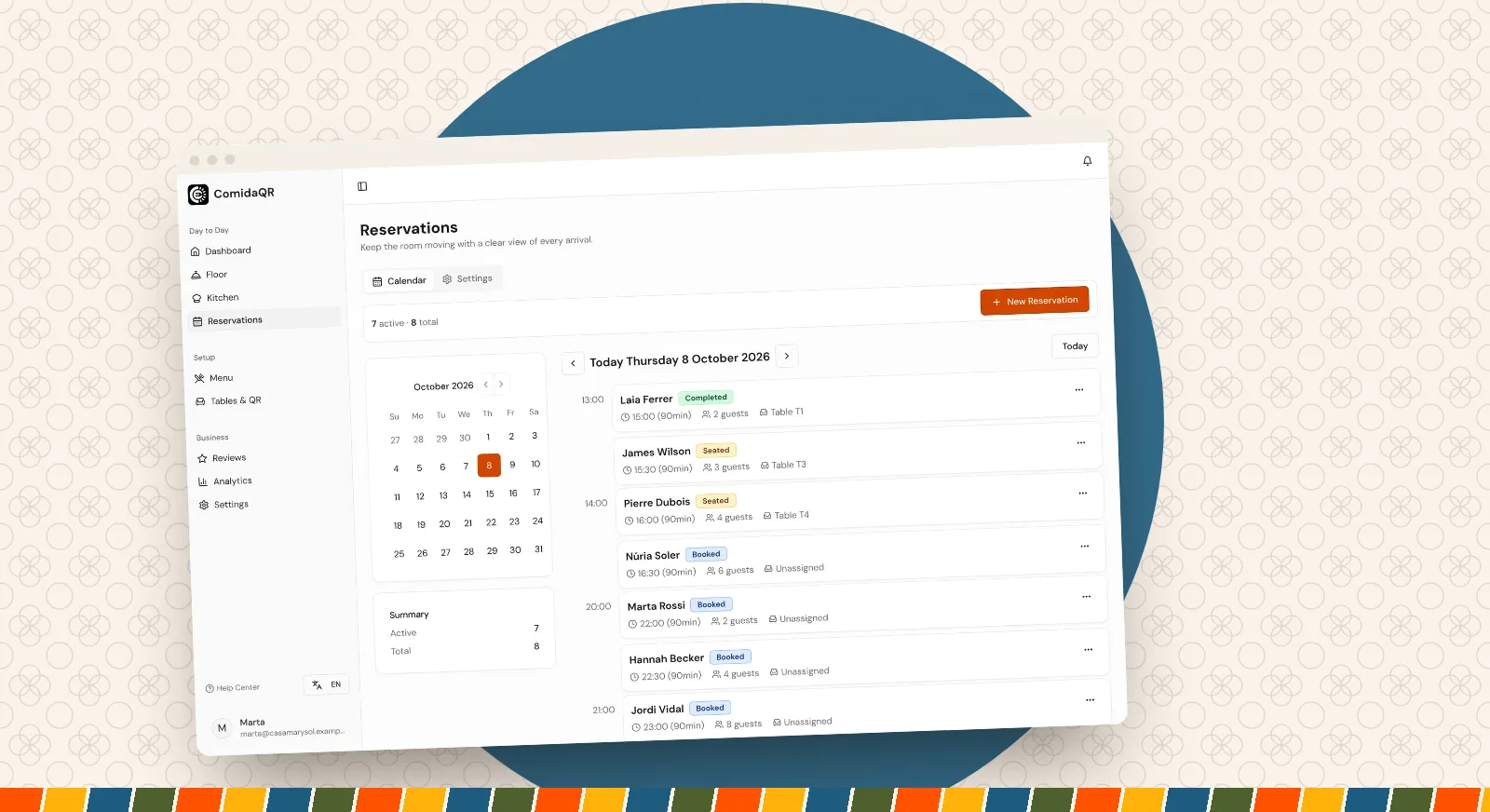
A day view turns reservation management from a chore into a clear operational picture. In ComidaQR each booking for the day shows the guest's name, time, party size, table if one is assigned, and any notes. If two bookings are given the same table at the same time, the clash is flagged so you can fix it before service.
Availability follows rules you set once: opening hours for each day of the week, the length of a booking slot, how long before closing the last booking can start, how much notice guests must give, and how many days ahead they can book. These settings adapt the booking page to your restaurant's rhythm and service style.
Guest Details That Matter
A reservation is more than a time slot: it's a commitment to provide a specific experience. Capturing the right guest details at booking time makes this possible. ComidaQR's booking page asks for a name, email and party size, plus an optional phone number and notes. Encourage guests to use the notes for special requests (birthday celebrations, high chair needed, wheelchair access) and preferences (window seat, quiet area): that is what turns a basic booking into personalized service.
Guests receive a confirmation email with a link to change or cancel their booking themselves, which saves your team phone calls. Staff can also add and edit bookings by hand, for example when someone calls. And if a guest has missed a booking before, ComidaQR shows a badge next to their name, so you can decide whether to call ahead to confirm.
From Reservation to Active Session
The most useful feature of an integrated reservation system is seating a booking in one step. When a reserved guest arrives, you seat the reservation on its table and ComidaQR opens a table session straight away, showing the 4-digit code the guests use to join and order. No duplicate data entry, no gap between 'arrived' and 'ready to order'.
Seating also checks that the table is actually free. If Table 5 still has an open session from the previous guests, ComidaQR won't seat the new reservation there until that session is settled or cleared. This simple safety net prevents the kind of awkward situations that damage the guest experience.
Handling No-Shows and Cancellations
No-shows are an unavoidable reality of the restaurant business. A good reservation system helps you manage them gracefully. Grace periods provide a buffer before marking a reservation as a no-show: the guest stuck in traffic should arrive to a welcoming table, not a cancelled booking. ComidaQR marks a booking as a no-show automatically once its grace period has passed (30 minutes by default), and staff can also mark one by hand.
Keep an eye on which services and which guests tend to miss bookings. If no-shows keep hurting the same evening, a quick call to confirm larger parties, or a clearly stated cancellation policy, is usually a safer response than taking more bookings than you have seats.
Cancellation handling should be equally smooth. When a guest cancels through their link, or your team cancels for them, the time goes back into availability on the booking page and the guest receives a cancellation email. You can then offer the free table to walk-ins as they arrive.